





I saw Debbie O'Brien's post about adding WebMCP to her site and thought this could be pretty cool for my own website. She also shared a walkthrough on X, which is worth checking out.
My first question, though, was whether it would work on a static website. This site uses Hugo, and GitHub Pages serves the generated files. There isn't an application server sitting behind each page waiting to answer an agent's questions.
Turns out, we don't need one!
So I added WebMCP to montemagno.com, with six read-only tools backed by a Hugo-generated content catalog. GitHub Pages still serves static files. No new backend, hosted AI model, chatbot widget, or runtime dependency.
A compatible client can now use those tools to answer questions like:
- Which of my apps support macOS?
- What published posts do I have about GitHub Copilot?
Here is a real Copilot CLI run discovering the tools and making those queries through a loopback relay:
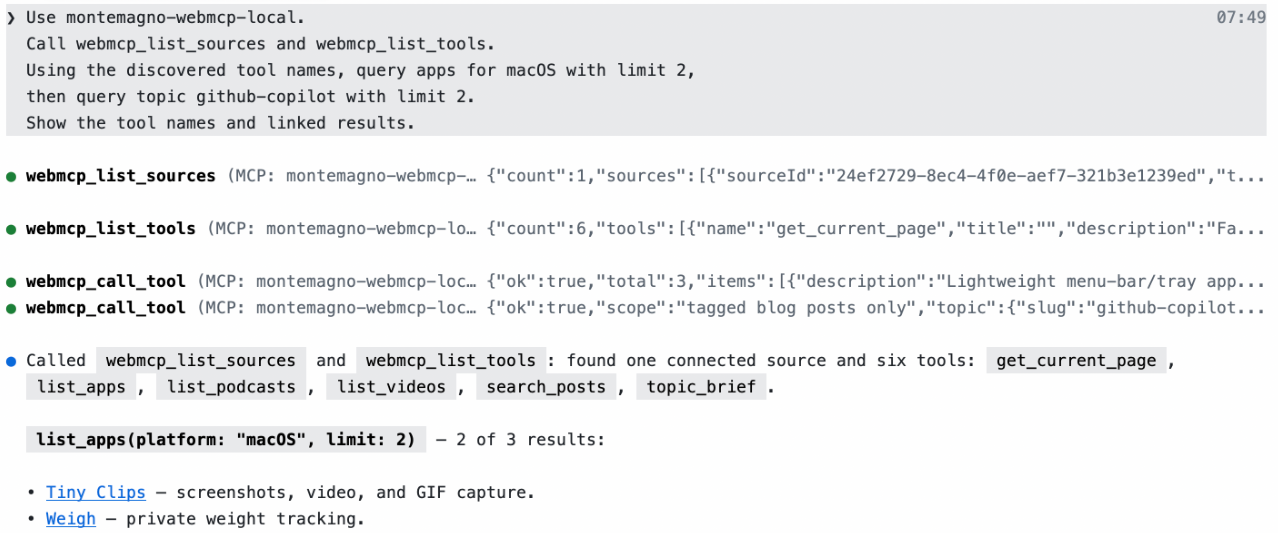
Let's walk through what the tools do, how Hugo prepares their data, how to try them in Edge or Chrome, and a prompt for adding WebMCP to your own site.
Before you try it: WebMCP is experimental. You'll need a browser exposing the native API through its testing feature or a valid origin trial, plus a compatible client. The setup below starts with Edge.
WebMCP runs in your browser tab
WebMCP is a proposed web standard for exposing structured tools from a page. Each tool describes its purpose, defines inputs with JSON Schema, and supplies an execute function. Our JavaScript knows which content source to query and returns structured results.
That is different from hosting a conventional MCP server. Chrome's comparison explains the distinction: MCP connects clients to external systems through a protocol; WebMCP provides browser APIs for tools associated with the open page.
The page must be open, and the caller must support discovering and invoking its tools. This doesn't automatically give every chatbot or crawler access.
We used the imperative JavaScript API because our tools query existing content. WebMCP also has a declarative HTML-form API.
Two halves: build-time data, browser-time tools
The GitHub Pages hosting model fits neatly here: Hugo prepares the files at build time, GitHub Pages serves them, and JavaScript executes the tools in the browser.
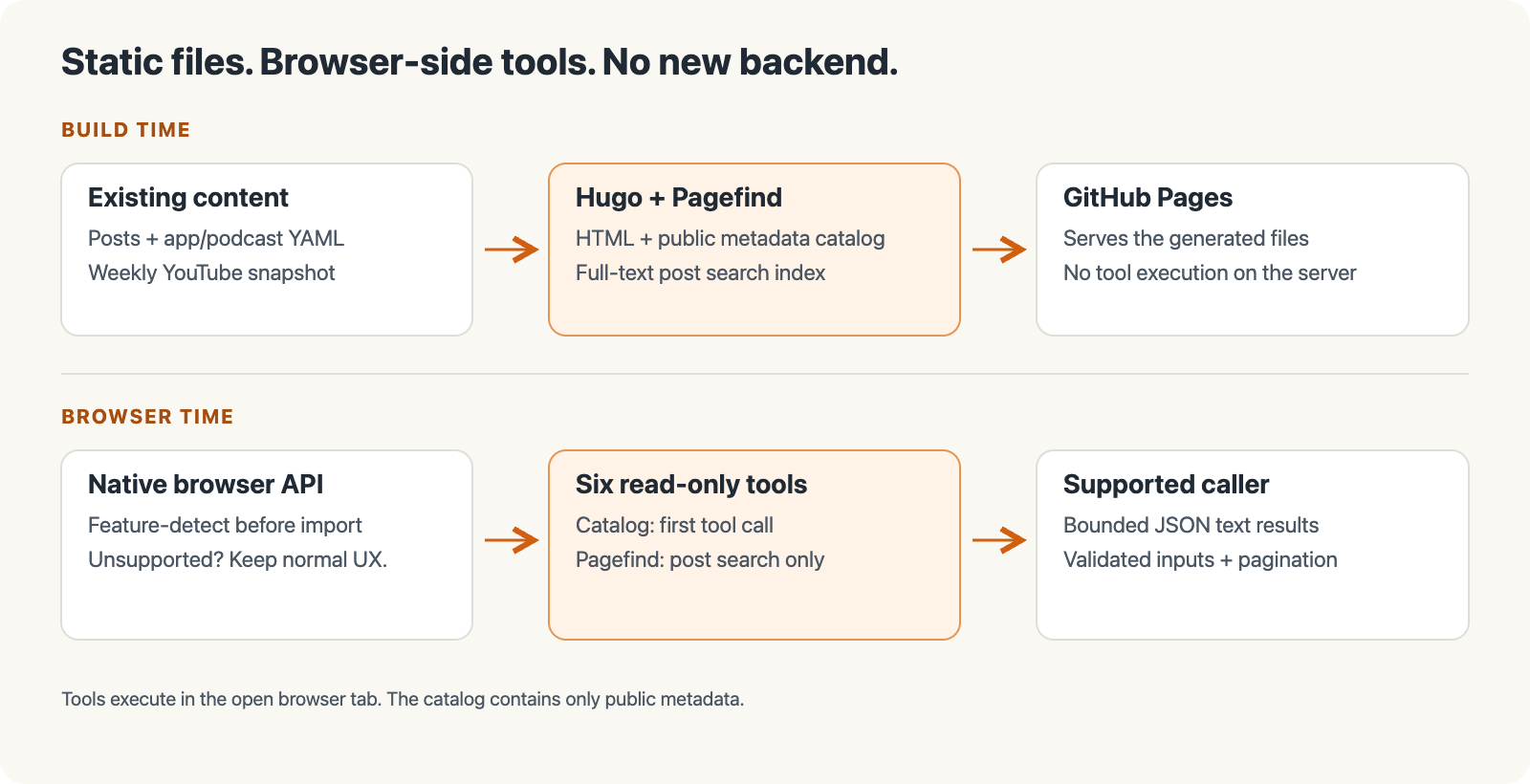
We already have the data. Hugo knows post titles, dates, tags, URLs, and descriptions. My Apps uses curated YAML, Podcasts uses show data, and Videos uses a weekly YouTube snapshot. Pagefind already indexes post text.
The integration gives callers a structured way to query those sources rather than creating a second content collection.
An app lookup, for example, filters catalog records in the tab. Full-text post search queries Pagefind's generated index instead. That split lets us reuse each source for what it already does well, rather than making the catalog a second search engine.
Build tools around the data you actually have
Debbie's implementation inspired the approach, but our six tools follow this site's content:
| Tool | What it returns |
|---|---|
search-posts |
Pagefind-ranked published blog posts, with excerpts and matching heading links. |
topic-brief |
Counts, first/latest publication dates, and newest highlights for posts carrying a real tag. |
get-current-page |
Metadata, heading links, and existing eligible related posts for the open page. |
list-apps |
Curated apps, filtered by query or platform, with website, store, and declared repository links. |
list-podcasts |
Active or archived shows and listening links. Defaults to active shows. |
list-videos |
Title filtering and Videos/Presentations selection from the limited weekly YouTube snapshot. Defaults to Videos. |
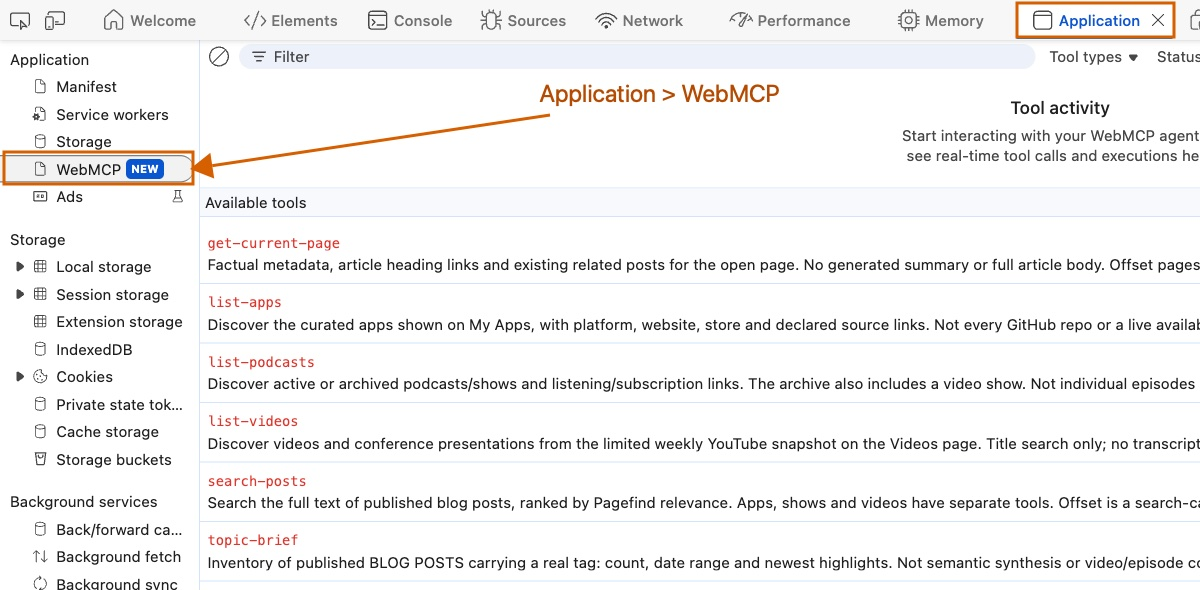
Those scopes matter. topic-brief is a tagged-post inventory, not an AI-generated synthesis. Podcasts are shows, not episodes. Videos use the existing snapshot, not a complete archive, and don't search transcripts, chapters, or topic tags. Video responses include the sync date and source links.
Your site might only need post search and current-page context. Start with what your data can honestly answer!
Let Hugo generate the catalog
In hugo.toml, we added a custom output format:
[outputFormats.webmcp]
  mediaType = "application/json"
  baseName = "webmcp/index"
  isPlainText = true
  notAlternative = true

[outputs]
  home = ["html", "rss", "ghostrss", "webmcp"]
Keep your existing home outputs when adding the new format; this site's list includes its feeds.
Hugo uses layouts/home.webmcp.json to produce /webmcp/index.json, containing posts, pages, tags, apps, shows, and videos. Inside the eligible-page loop, this excerpt builds each page record:
{{- $description := .Description | default .Params.excerpt | default .Summary | plainify | htmlUnescape | replaceRE "\\s+" " " | strings.TrimSpace | truncate 300 -}}
{{- $record := dict "url" .Permalink "title" .Title "description" $description -}}
Posts also get publication dates, tag links, and reading time. Apps get declared platforms and links; videos get their collection and publication date.
This is metadata, not a copy of the site: no full article bodies, images, or players. Pagefind handles full-text post search.
Keep unpublished content out
Preview builds can include unpublished content, so Hugo's build settings aren't enough. The catalog and bootstrap share a webmcp-eligible.html partial that:
- Excludes drafts, scheduled/future or expired posts, and
robotsNoIndexpages. - Requires HTML output and excludes headless, render-excluded or unlisted pages, redirects, and 404s.
- Omits tags without eligible public posts.
Sharing that check keeps the two halves aligned: a page excluded from the catalog doesn't gain tool registration just because we opened a draft preview. It also gives us one place to update the site's publishing rules.
Every emitted catalog record is public. Neither WebMCP nor noindex is access control. Never put private material in the snapshot and expect the browser API to hide it.
Give each tool a clear contract
In assets/js/webmcp.mjs, a shared helper adds pagination inputs, JSON Schema, runtime validation, explicit errors, and read-only annotations.
That shared contract makes another tool less work: describe its filters, choose a data source, and keep the handler focused on the query. It shouldn't need a different pagination convention or a new interpretation of what an invalid input means.
These are its schema and annotation fields, not a complete registration:
inputSchema: {
  type: 'object',
  properties,
  required,
  additionalProperties: false,
},
annotations: { readOnlyHint: true },
The helper supplies execute, checks inputs before calling tool-specific logic, and serializes failures with a code and message.
The app definition then filters the catalog. This excerpt uses that shared tool helper, the lazy catalog loader, and filtering/pagination helpers:
tool('list-apps', 'Discover the curated apps shown on My Apps, with platform, website, store and declared source links. Not every GitHub repo or a live availability check.', {
  query,
  platform: {
    type: 'string',
    enum: ['Windows', 'macOS', 'iOS', 'Android', 'Web', 'Stream Deck'],
  },
}, [], async (input, signal) => {
  const data = await catalog(signal);
  return listResponse(data.apps.filter(item =>
    matches(item, input.query) &&
    (!input.platform || item.platforms.includes(input.platform))
  ), input);
}),
The schema tells a caller what to send; runtime validation enforces it. The read-only hint describes behavior that the implementation must actually honor.
Load nothing extra for unsupported browsers
In layouts/_partials/scripts.html, eligible pages get a bootstrap that checks the native API before importing a fingerprinted module. Here it is, with the outer template guard omitted:
{{- $webmcp := resources.Get "js/webmcp.mjs" | js.Build (dict "targetPath" "js/webmcp.js" "format" "esm" "minify" true) | fingerprint }}
<script type="module">
  const api = document.modelContext;
  if (api && typeof api.registerTool === 'function') {
    import({{ $webmcp.RelPermalink | jsonify | safeJS }}).then(({ registerWebMCPTools }) =>
      registerWebMCPTools(api, {
        catalogURL: {{ "webmcp/index.json" | relURL | jsonify | safeJS }},
        pagefindURL: {{ "pagefind/pagefind.js" | relURL | jsonify | safeJS }}
      })
    ).catch(error => console.error('WebMCP registration failed', error));
  }
</script>
The Hugo expressions supply generated asset URLs. With another generator, use its asset pipeline and honor any repository base path, rather than assuming assets live at the origin root.
Unsupported browsers don't load the tool module, catalog, or Pagefind through this integration. Human-facing search can still load Pagefind independently.
In supported browsers, the catalog loads on the first tool call; Pagefind loads only for search-posts. Failed downloads can be retried.
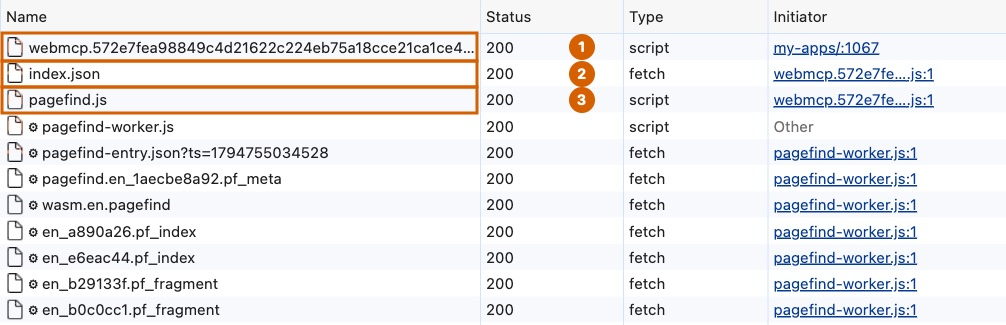
Read-only means no publishing, settings changes, or video playback. Cancellation stops one caller waiting without disrupting others sharing a load. If registration fails partway through, the module aborts its registration controller, removes the tools already registered, and reports the failure.
Small responses, honest pagination
Tools return JSON text with ok, plus explicit codes/messages for errors. Invalid input isn't disguised as an empty search.
Responses are capped at 4,000 serialized characters, using JavaScript string length. Lists default to five items, with a requested maximum of ten; the cap may shorten optional fields or return fewer items.
Results include:
hasMore: whether there is another page.nextOffset: the continuation value to pass back unchanged with the same query and filters.trimmed: whether optional information or the returned page was shortened to fit.
These are character limits, not measurements of tokens saved or model costs.
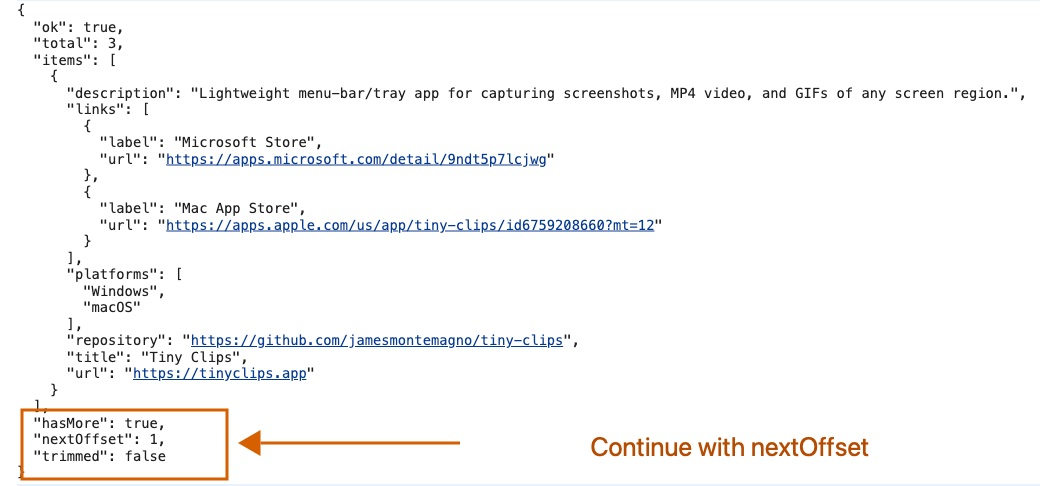
Pagefind can include entries from preview builds, so search-posts checks candidates against the public catalog. It reads an extra eligible hit to determine whether more results exist without exposing a draft-inclusive raw total.
The cursor tracks search candidates, not just returned public results. Pass nextOffset back unchanged; calculating it from the item count could skip results.
Try the tools in Edge or Chrome
You can inspect the tools without an agent, then connect Copilot CLI in the next section. Use an up-to-date Microsoft Edge or Google Chrome build exposing the current native API. Edge comes first here, matching the screenshots.
Browser setup in Microsoft Edge
Microsoft's WebMCP Labs guide recommends current Canary or Dev builds, available from Edge Insider.
- Open
edge://flags/#enable-webmcp-testing. - Set WebMCP for testing to Enabled.
- Restart Edge when prompted.
- Open montemagno.com, right-click the page, and select Inspect. In DevTools, open Application, then WebMCP.
We verified this flag-and-restart workflow in Edge; the screenshots show its native inspector.
Browser setup in Google Chrome
For Chrome, follow its current WebMCP documentation:
- Open
chrome://flags/#enable-webmcp-testing. - Set WebMCP for testing to Enabled.
- Relaunch Chrome and open montemagno.com.
Check the API and call a tool
In either browser, run this in the page's DevTools Console:
typeof document.modelContext?.registerTool === 'function'
It should return true. Otherwise, update your browser or try a current preview build. If the API exists but no tools appear, reload and check the Console for registration errors.
On montemagno.com, discover and invoke a tool:
const tools = await document.modelContext.getTools();
const videos = tools.find(tool => tool.name === 'list-videos');
if (!videos) throw new Error('list-videos is not registered on this page');
const text = await document.modelContext.executeTool(videos, {
  collection: 'presentations',
  limit: 5,
});
const result = JSON.parse(text);
console.log(result);
executeTool receives the discovered tool object and an ordinary input object, as documented in Chrome's imperative API guide. The calls are the same in Edge and Chrome.
This is a useful first checkpoint. If discovery and execution work here, you've checked the site and browser without involving an agent or MCP bridge. Any later CLI connection problem can then be investigated as a separate layer.

You can also use the Application > WebMCP inspector. Select topic-brief, enter github-copilot for topic, and inspect the input, completion status, and output.
What we checked: 83 offline gate tests passed, including WebMCP fixtures for publication rules and tool contracts. We also exercised all six tools through native Edge and checked normal search, theme switching, navigation, and lazy-network behavior.
Recommended CLI setup: Edge and the loopback relay
For Copilot CLI, MCP-B's local relay is the focused option we used. It forwards a browser tab's WebMCP tools without adding a full debugging toolset.
We'll use Edge, but the same relay configuration works with Chrome. It exposes four management tools for sources, discovery, invocation, and opening pages, plus the connected site's tools.
GitHub Copilot CLI
  -> stdio -> WebMCP local relay on your machine
    -> loopback WebSocket, port 9334 -> browser adapter
      -> montemagno.com's native WebMCP tools
The tab needs a temporary browser adapter as well as the relay. This is client-side demo setup, not a website dependency or polyfill. The relay alone can't discover an arbitrary page, and this route doesn't require Chrome DevTools MCP.
1. Add the local STDIO relay
With Node.js 22 or newer and Copilot CLI installed, run its MCP configuration command:
Choose Local / STDIO in a connection-type picker. Copilot launches this process and talks through standard input/output:
copilot mcp add montemagno-webmcp -- \
  npx -y @mcp-b/webmcp-local-relay@6.2.0 \
  --port 9334 \
  --widget-origin=https://montemagno.com
Keep these connections distinct:
| Connection | Setting |
|---|---|
| Website open in Edge or Chrome | https://montemagno.com/ |
| Copilot CLI to the MCP relay | Local / STDIO, using the command above |
| Browser adapter to the relay | Loopback WebSocket on port 9334 |
Neither port 9334 nor the website is an HTTP MCP endpoint. There is no /mcp URL to enter. The relay reference documents its loopback binding; don't expose it on your network.
Restrict --widget-origin to the page's exact origin: scheme, hostname, and port if present, not the relay's address. Change it when adapting this setup to another site or development server.
Start or restart copilot, then check /mcp show montemagno-webmcp. Confirm it is connected before loading the adapter. Nothing is being installed on GitHub Pages.
2. Connect your Edge or Chrome tab
Open montemagno.com in the browser prepared above. In that page's DevTools Console, load the adapter:
const bridge = document.createElement('script');
bridge.src = 'https://cdn.jsdelivr.net/npm/@mcp-b/webmcp-local-relay@6.2.0/dist/browser/embed.js';
bridge.dataset.relayPort = '9334';
bridge.addEventListener('error', () =>
  console.error('WebMCP relay adapter failed to load')
);
document.head.append(bridge);
Keep the ports matched: --port 9334 and bridge.dataset.relayPort = '9334' must agree. If the port is occupied, choose an unused one and change both.
Review the embed documentation before loading third-party code. Both examples pin version 6.2.0. A reload, including development live reload, removes the adapter; paste it again to reconnect.
The browser may request Local Network Access permission. Review it rather than disabling protections. A site's content security policy can also block the adapter; consult the relay's troubleshooting guide.
This relay doesn't automate the browser or create a separate profile. Keep the connected page open in a dedicated demo window without private tabs or accounts.
3. Send the prompt
Try this prompt in Copilot CLI:
Use the montemagno-webmcp MCP server. Call webmcp_list_sources and
webmcp_list_tools, then select the source at https://montemagno.com/.
Use the actual relayed tool names returned by discovery to call the
site's list-apps with platform macOS and limit 2, then topic-brief
with topic github-copilot and limit 2.

Show the tool names and linked results. Use the registered WebMCP
tools, not answers inferred from scraping. If no source is connected
or a tool call fails, report the blocker instead of inventing results.
The relay converts list-apps to MCP-safe list_apps, so use the discovered names. Our run found one source and six tools, then successfully called the app and topic tools.
If you only see the four webmcp_* management tools, the relay process is available, but you still need to check its connected sources. Client tool lists don't always refresh immediately, so use the discovery calls rather than guessing whether the adapter connected.
The opening screenshot uses our local-test alias, montemagno-webmcp-local. These public-site examples use montemagno-webmcp. Keep your chosen name consistent between configuration and prompts.
Optional: automatically launch Edge or Chrome
You can skip this if you followed the relay recipe. Chrome DevTools MCP is an alternative that launches its own browser and adds broader debugging tools. It supports Edge and Chrome without the temporary adapter.
These commands are for macOS, Edge first. Use a current Node.js LTS release and a browser exposing native WebMCP.
Microsoft Edge:
copilot mcp add montemagno-edge -- \
  npx -y chrome-devtools-mcp@1.13.0 \
  --executablePath="/Applications/Microsoft Edge.app/Contents/MacOS/Microsoft Edge" \
  --categoryExperimentalWebmcp \
  --chromeArg=--enable-features=WebMCP \
  --isolated \
  --no-usage-statistics \
  --no-performance-crux
Google Chrome:
copilot mcp add montemagno-chrome -- \
  npx -y chrome-devtools-mcp@1.13.0 \
  --categoryExperimentalWebmcp \
  --chromeArg=--enable-features=WebMCP \
  --isolated \
  --no-usage-statistics \
  --no-performance-crux
The server auto-detects Chrome. For Edge Dev/Canary or another OS, adjust the executable path using Microsoft's guide.
The WebMCP category exposes discovery/execution tools. --chromeArg passes the feature flag to either browser; the isolated profile doesn't inherit everyday settings. The last two flags disable usage statistics and CrUX lookups.
Choose one command, start copilot, and check /mcp show montemagno-edge or /mcp show montemagno-chrome. Edge's prompt is:
Use the montemagno-edge MCP server to open https://montemagno.com/.
Call list_webmcp_tools, then use execute_webmcp_tool to call the site's
list-apps with platform macOS and limit 2. Show the linked results.
Use native WebMCP, not scraping. Report any API or bridge blocker.
For Chrome, substitute montemagno-chrome. Keep private tabs/accounts out of the demo profile and approve only intended actions; this bridge can do more than call read-only site tools.
Try this on your own static site
The takeaway isn't to copy our six tools. Choose useful read-only operations for your existing public data and make them a tested browser enhancement.
Give this prompt to a coding agent in your site's repository. It starts with an audit and approval checkpoint, not assumptions about your generator or content:
Help me evaluate and integrate WebMCP into this static website.
Start in plan mode. Inspect the repository before proposing changes.

Identify the generator, hosting/base path, build/deploy workflow, existing
search engine, public content collections, curated data, and publishing
rules. Read current official WebMCP browser/API/trial documentation.
Report useful read-only tools supported by the actual data, their exact
scope, and missing capabilities. Do not assume video tags, transcripts,
chapters, podcast episodes, or cross-content search exist. Recommend a
small tool set and wait for my approval before implementation.

After approval, reuse existing sources and search logic. Generate only
eligible public metadata at build time; exclude draft, scheduled, future,
expired, noindex, headless, render-excluded, and non-HTML content according
to this site's rules, including preview builds and draft-only taxonomy
entries. Treat every emitted file as public, not private application state.

Use the current native browser API with feature detection before loading
the tool module. Load catalogs/search lazily, preserve ordinary UX, and
avoid a backend, hosted model, chat widget, or unnecessary dependencies.
Honor the site's base path. Declare truthful schemas and read-only hints;
validate inputs at runtime; return explicit errors; support cancellation,
retryable loads, and cleanup after partial registration failure.

Choose and test a serialized response cap, bounded item limits, and
continuation that never skips or duplicates eligible records. Explain
trimming, distinguish empty results from failures, and never expose
unpublished search data or draft-inclusive totals.

Add focused offline fixtures and prove native discovery/execution in a
supported browser, not just a shim. Test unsupported-browser network
behavior, normal search/theme/navigation, and publication boundaries.
Report actual results and blockers, not invented benchmarks.

Document browser/client prerequisites and use the real public website URL
in examples. If you include an MCP bridge, specify its transport, allowed
page origins, and matching browser/server port settings. Request my
approval before deployment or changes to external services, browser trial
enrollment, or account configuration.
There you go: a static website can offer browser-side tools without becoming a server application. Start with the data you have, keep the scope honest, and make sure everyone else can keep using the same website.