





One ZIP, one button, three destinations. An AI-generated illustration, not a screenshot.
Every week, Frank and I record Merge Conflict, and Zencastr hands me a ZIP with a transcript, an MP3, and a video. That part is great! What comes next is about an hour of busywork, by hand, every week: renaming files, making a thumbnail and captions, and uploading everything to YouTube, Patreon, and our podcast host...
So I sat down with GitHub Copilot in VS Code (specifically the Agents window) and built a little dashboard to do it for me. Now I drop in the ZIP, review what it came up with, and click one button. That's about five minutes of my time.
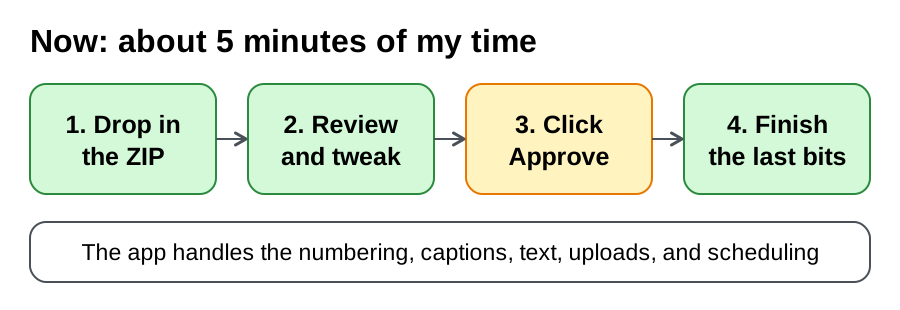
One thing up front: it isn't all automated (yet). There are still a few steps I do myself, and I'll show you which ones. Want to see it in action first? Here's the full demo:
Now let's take a look at how it all works!
The hour I wanted back
Here's what publishing an episode used to look like:
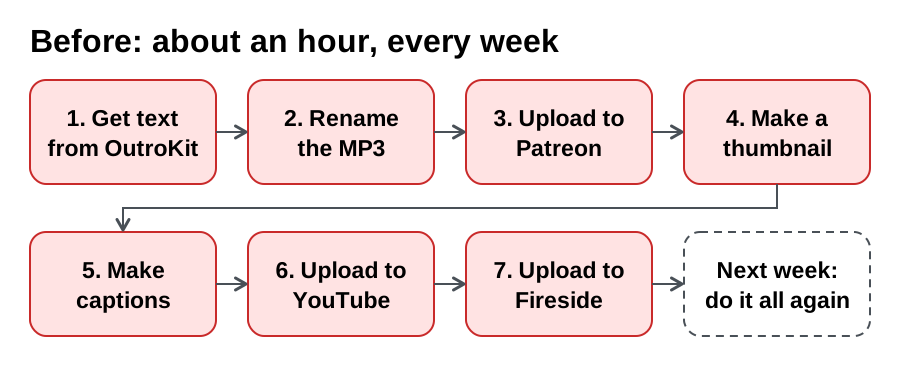
None of it is hard. It's just a lot of steps, every single week. So I typed that list into Copilot, attached that week's ZIP and our thumbnail overlay, and ended with one question:
What could we build to automate this all for me?
That was at 8:01 AM. I stepped away, and when I came back around 8:24 AM, the app had already imported that real ZIP! Then I took a 12-hour break to enjoy the day, came back, and approved everything within minutes. All told, it took about an hour of hands-on time to go from idea to production, and now I have a repeatable process I can use every week.
What we built
It's a local dashboard that runs on any OS, built with Blazor on .NET 10. Why Blazor? I love .NET, OutroKit is all .NET, and it gives me the most flexibility in my workflow.
You start by dropping in the ZIP:
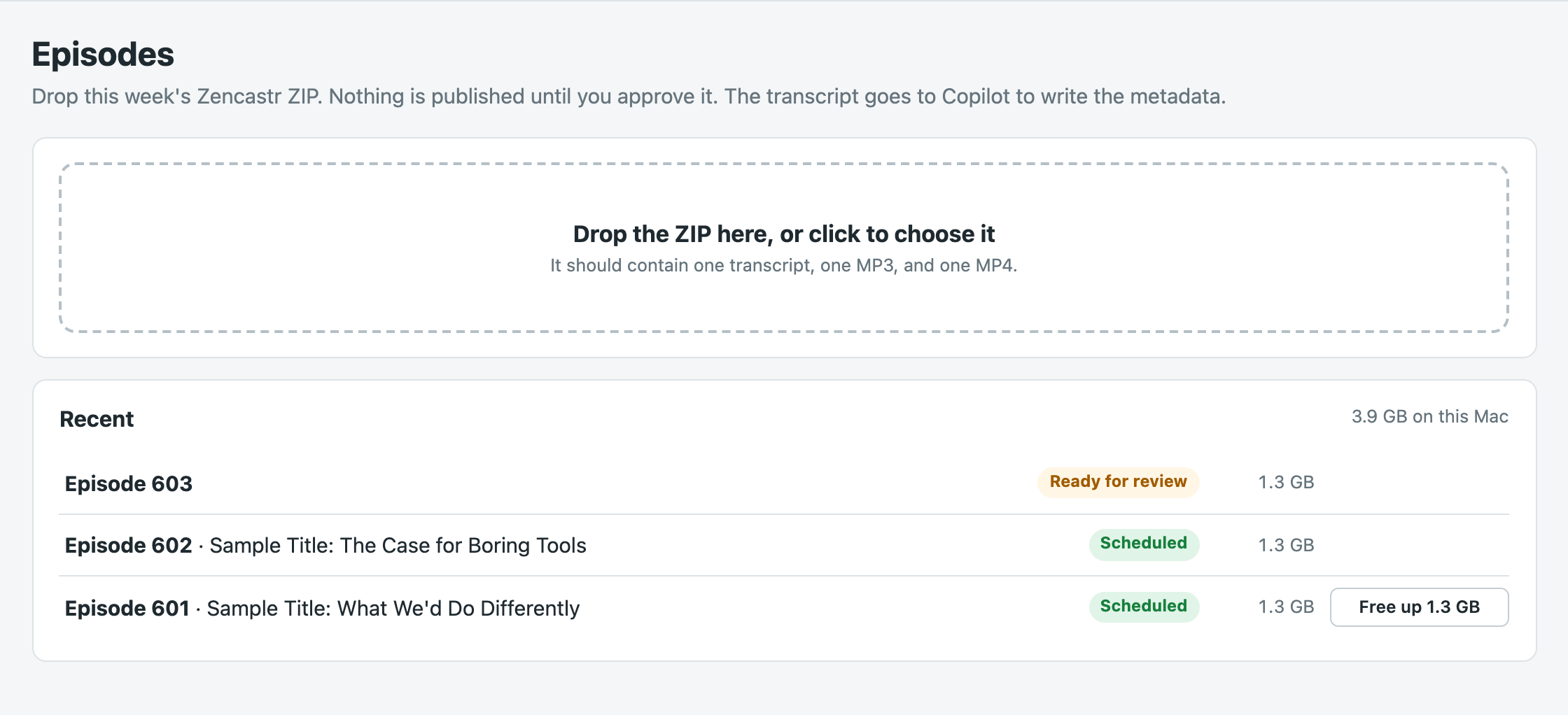
The app then does the prep work. It suggests the next number from the feed and any Fireside drafts, makes the numbered MP3, converts the captions, gets the text from OutroKit, and sets the release to next Monday.
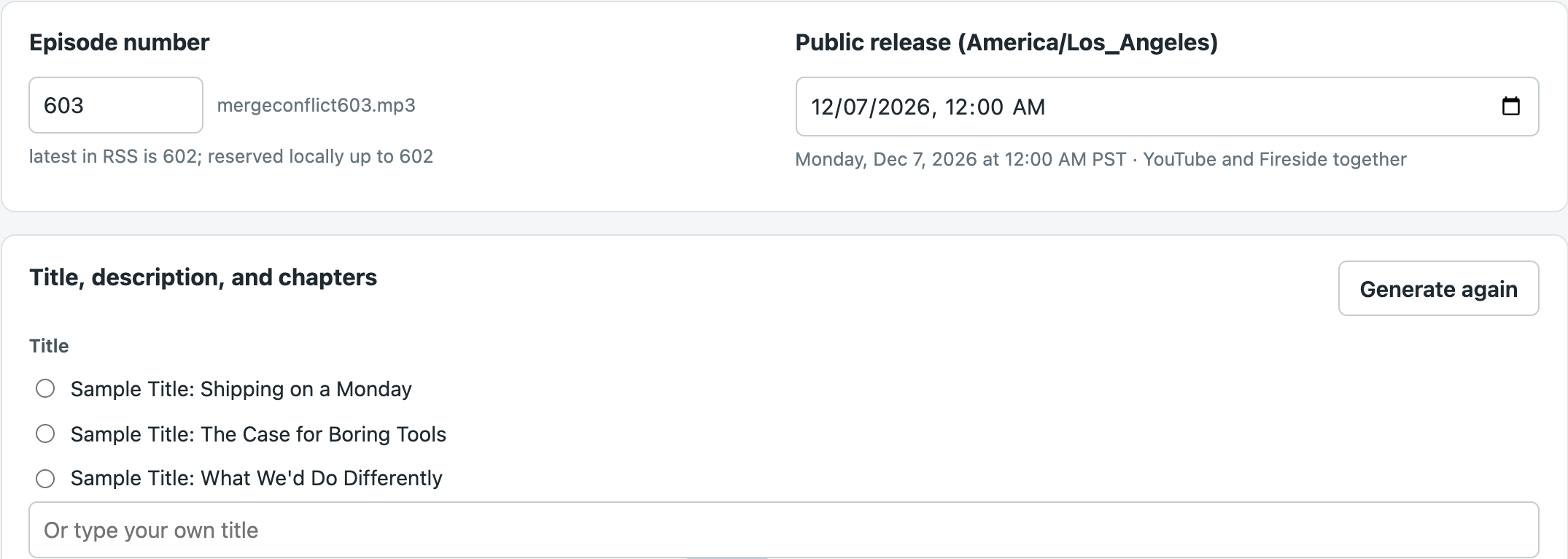
Nothing goes public while it does that. I still read it all, pick a title, and make the thumbnail. The transcript does go to Copilot, because that's how OutroKit writes the text.
One click, and what it promises
Here's how it all fits together:
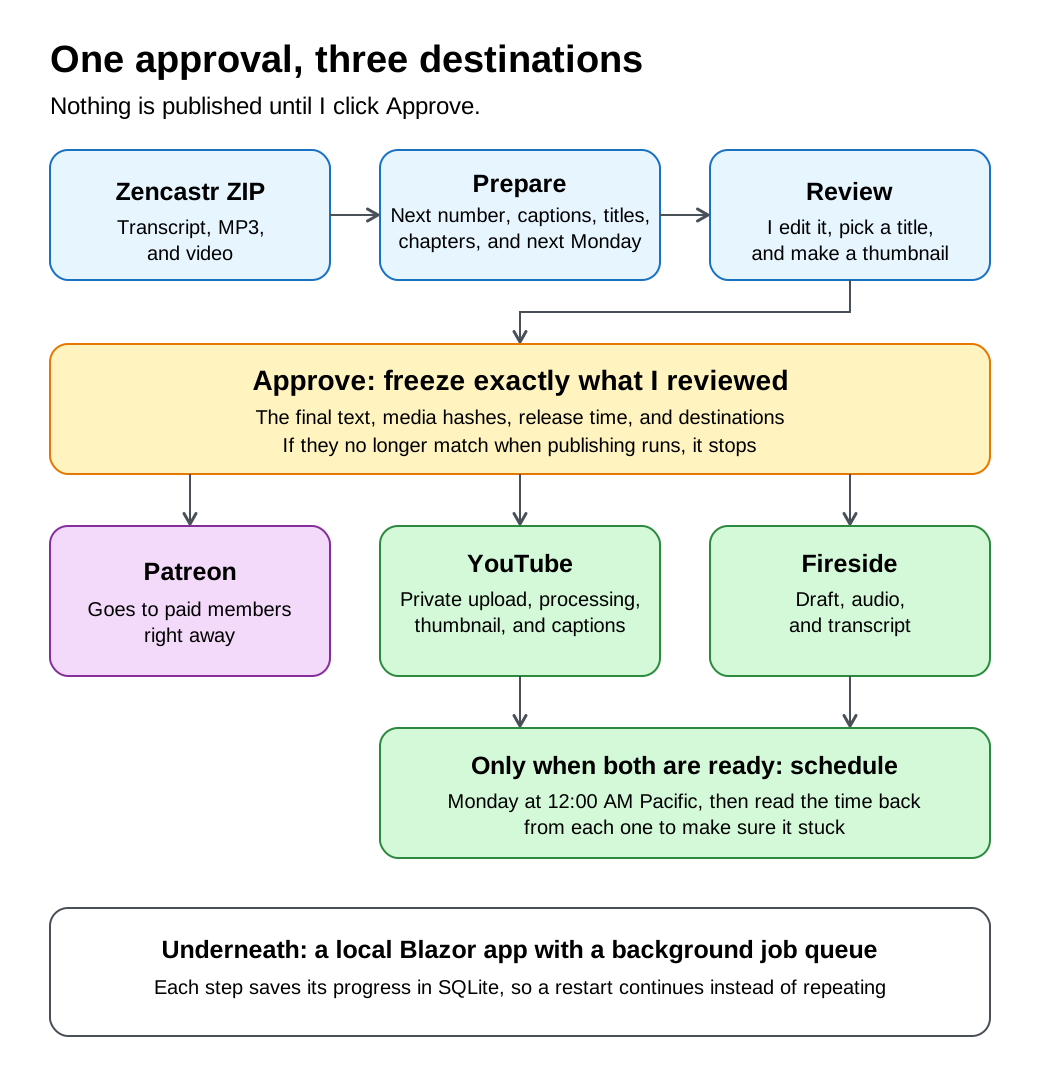
This is the heart of the app. One button is going to send something out to three different places, so that button had better mean something. The approve button stays disabled until the episode is actually ready:

When I do click it, the app freezes a snapshot of the final text, the media file hashes, the release time, and the destinations. Then, every time a publishing run starts or restarts, it builds that snapshot again and compares:
var current = await approvals.BuildSnapshotAsync(episode, settings, cancellationToken);
if (ApprovalService.Hash(current) != episode.Approval.SnapshotHash)
{
    await store.UpdateAsync(id, e =>
    {
        e.Approval = null;
        e.AddLog("Stopped: the episode changed after approval, so nothing further was sent. Review and approve it again.", isError: true);
    });
    return;
}
So if the text, a media file, or the release time no longer matches what I approved, it stops and asks me again. A few YouTube settings like tags, category, and the playlist sit outside the snapshot, so changing those won't cancel anything.
From there, YouTube and Fireside are both staged privately, and neither gets scheduled until both are ready. Long uploads run in a background job, and each step saves its progress, so a restart picks up where it left off. API keys stay in the operating system's secure storage.
The app also doesn't take "success" for an answer. After it schedules a video, it asks YouTube what it actually saved:
await youTube.SchedulePublishAsync(videoId, snapshot.ReleaseAtUtc, settings.YouTubeMadeForKids, cancellationToken);

var video = await youTube.GetVideoAsync(videoId, cancellationToken);
if (video?.Privacy != "private" || video.PublishAt?.ToUniversalTime() != snapshot.ReleaseAtUtc.ToUniversalTime())
{
    throw new UserFacingException("YouTube accepted the schedule but didn't report it back correctly. Check YouTube Studio.");
}
Fireside gets the same treatment. When you're scheduling something that goes out at midnight while you're asleep, you really want that check.
A real episode found two OutroKit bugs
OutroKit is my own open source .NET tool that writes the titles, descriptions, chapters, and subtitles for an episode, using the GitHub Copilot SDK. So hooking it up was the easy part. The app runs a pinned version as a local tool and reads back its JSON:
public async Task<IReadOnlyList<string>> ConvertToSrtAsync(string transcript, string output, CancellationToken cancellationToken)
{
    var outcome = await RunAsync(["srt", "convert", transcript, "--output", output, "--overwrite"], cancellationToken);
    if (outcome.ExitCode != 0 || !outcome.Success)
    {
        throw new UserFacingException($"Caption conversion failed: {outcome.ErrorMessage}");
    }
    return outcome.Result.TryGetProperty("warnings", out var warnings)
        ? warnings.EnumerateArray().Select(warning => warning.GetString() ?? "").ToList()
        : [];
}

public async Task<CaptionReport> FixCaptionsAsync(string input, string output, CancellationToken cancellationToken)
{
    var outcome = await RunAsync(["captions", "fix", input, "--output", output, "--overwrite"], cancellationToken);
    // Exit 4 means the fixed file was saved and readability findings remain for review.
    if (outcome.ExitCode is not (0 or 4))
    {
        throw new UserFacingException($"Caption check failed: {outcome.ErrorMessage}");
    }
    return ParseCaptionReport(outcome);
}
Then a real transcript showed up and found two bugs. When Frank and I talk over each other, Zencastr's timestamps land slightly out of order, and that pushed the captions about 3 minutes late by the end of the episode. OutroKit also dropped a line that just said "Like this," because it looked like a speaker's name.
The app worked around both for episode 540, correcting 24 out-of-order turns and saving that one line. I then fixed both in OutroKit itself, which is exactly why you run your tools on real data!
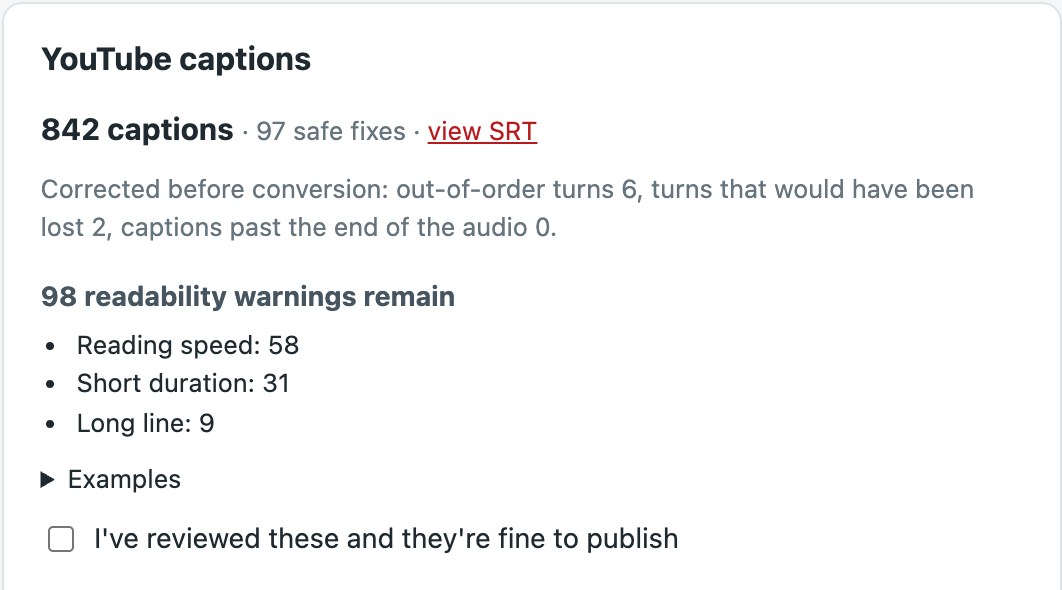
This is also why the review step matters. OutroKit gave me 10 title options that week, and one of them said ".NET Conf 2024." Close!
AI never touches the logo
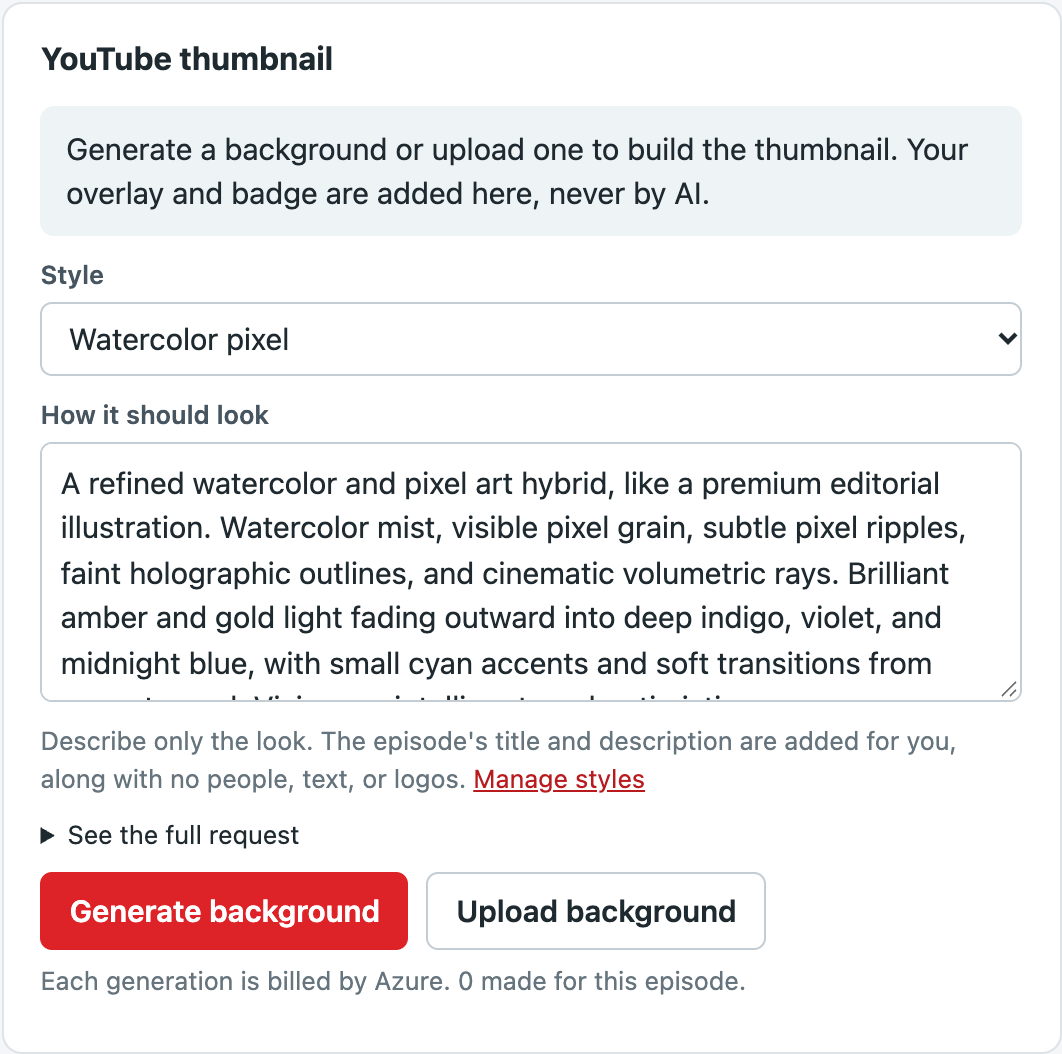
Now for the thumbnails. Here's what I told Copilot: "For the image generation, I never want people and have a specific look." The app uses image generation on Microsoft Foundry to make only the background. It then adds our real overlay and episode badge on top, right on my machine, so the branding is always exactly right.
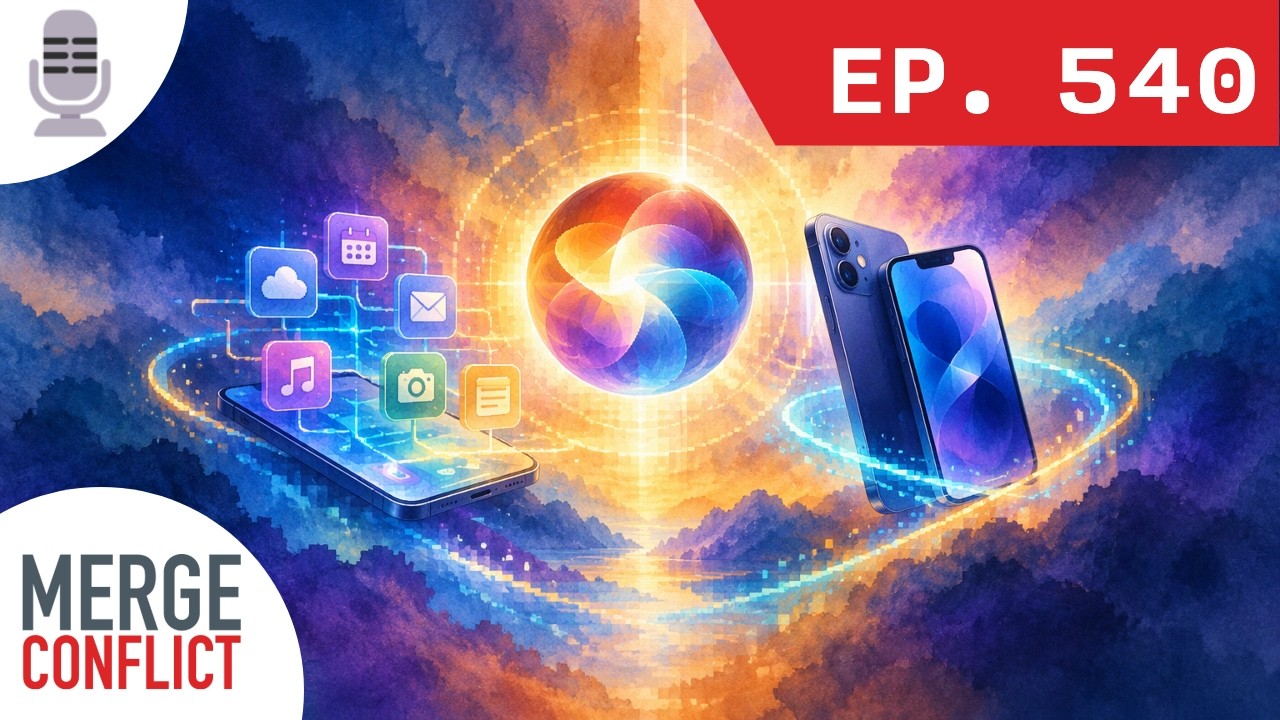
Every prompt asks for no people, text, or logos. Image models don't always listen, though, so I still check each one.
I also wanted more variety: "We should also include the episode title and description so it is unique." So there are five built-in styles, and each prompt gets that episode's details.
The wins, and what's still on me
So what does all of this get me? Here's everything I don't do by hand anymore:
- The episode number: the app finds the next one from the feed and Fireside, names the MP3 to match, and stops me if a number is already taken.
- The writing: titles, descriptions, and chapters are waiting for me when I open the episode.
- The captions: they get converted, cleaned up, and checked for readability.
- The thumbnail: fresh art in the style I pick, with the real logo and badge added for me.
- YouTube: the video, details, thumbnail, captions, and playlist are all handled, scheduled for Monday at 12:00 AM Pacific, and checked.
- Fireside: the draft, details, audio, and transcript are all handled, scheduled for the same time, and checked.
- The X post: it's written and ready to go in the composer.
- Cleanup: after the release, one click frees up the big video and audio files.
And here's what's still on me:
- Reviewing everything and clicking Approve. That one's on purpose!
- Publishing the post on Patreon.
- Adding header image in Fireside.
- Scheduling the post on X.
Episode 540 went out at midnight, right on time. Not bad for a little dashboard!
Wrapping up
An hour down to about five minutes. I'll take it!
The thing I keep coming back to is how much of this came from using it. The first version came together fast, but the best parts showed up when a real episode hit something weird and I could just say so. If you have a chore you do every single week, give it to GitHub Copilot as a real task and see what you build together. Keep a human in the loop for the part that goes out to the world, and make your app check its own work.
Want to see the result? Check out episode 540 of Merge Conflict, and take a look at OutroKit if you make a podcast too. Happy publishing!